A profile or project may rely on more than its visible settings. A plugin capability or script can add a dependency, transform the slicing data, or change exported G-code. Record where it acts and inspect the file produced after that step.
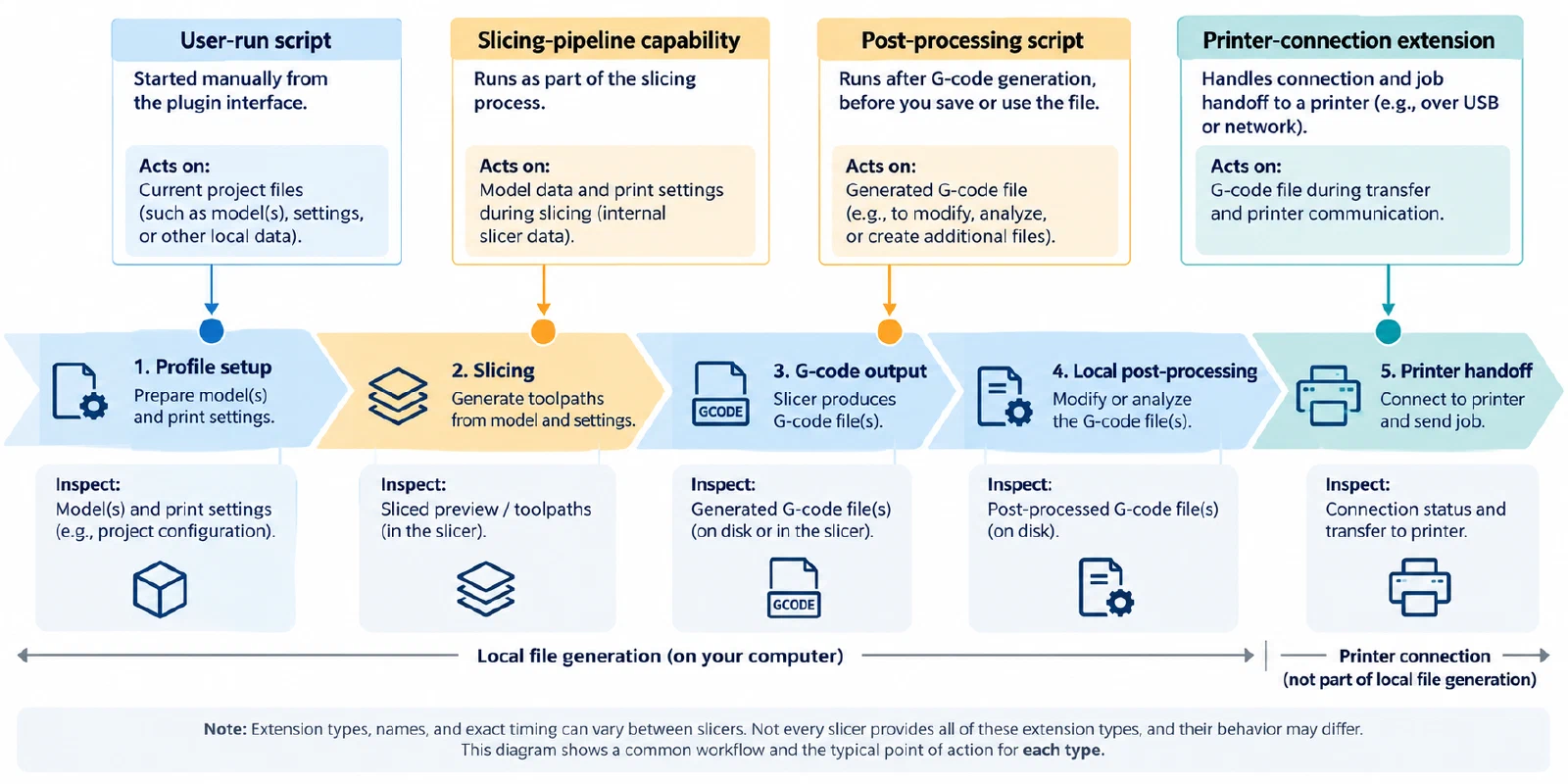
Identify the extension and when it runs
| Extension type | When it acts | What to check |
|---|---|---|
| User-run plugin script | When the user starts it from the plugin interface | The selected script, its inputs, and the changes it reports or produces |
| Slicing-pipeline capability | At a selected stage in the slicing workflow | The capability, configuration, stage order, and any geometry or G-code change |
| Post-processing script | After a slicer has generated G-code | The script identity, the final file after the script, and any change to the output name |
| Printer-connection extension | During a connection or handoff workflow | The target and connection state; this is separate from checking a locally generated file |
OrcaSlicer’s current project guide says its Python Plugin System is available in nightly builds or releases greater than 2.4.2. Check the exact application version and the selected plugin’s information before relying on a feature. The project documentation describes plugin details such as source, author, installed and latest version, capabilities, configuration, changelog, and diagnostics.
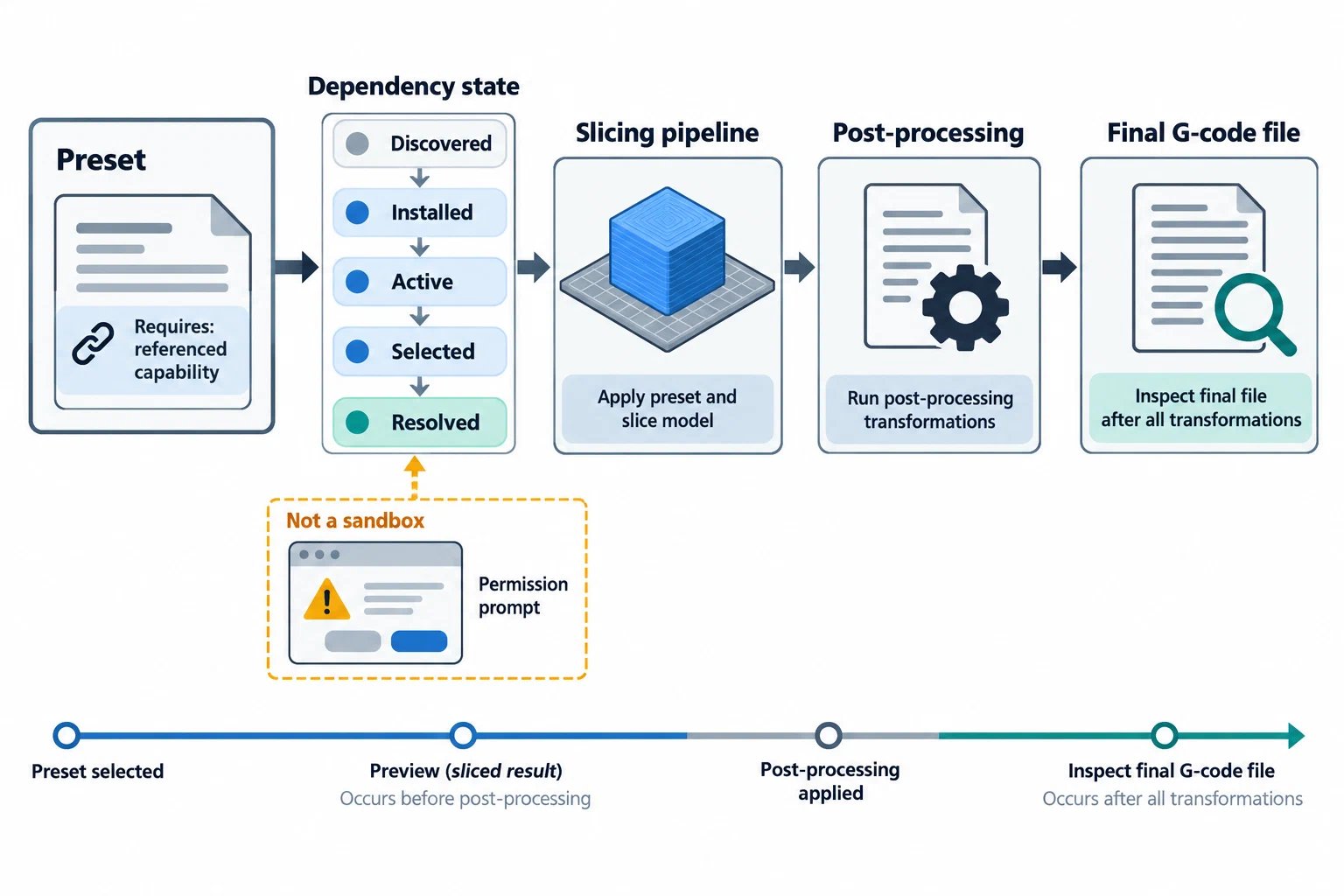
The plugin states are separate. Finding a plugin in a browser does not mean it is installed; installation does not mean it is active; and an enabled plugin does not mean every capability is selected. A saved preset may refer to a capability and may keep a preset-specific configuration. An inactive or missing reference can stop slicing until the reference is resolved or the setting is changed. Record the exact dependency rather than assuming it travels with a preset.
Follow the transformation to the final file
OrcaSlicer’s project wiki describes slicing-pipeline capabilities that can inspect or modify the live slicing graph or edit exported G-code. The guide marks this capability experimental and warns that it can change generated geometry or G-code. A preview or profile screenshot may therefore describe an earlier stage than the file you intend to use.
PrusaSlicer’s documentation says post-processing scripts receive a temporary G-code file, can modify it in place, and then the resulting file is written to the selected destination or sent to a host. Its G-code viewer shows the file before post-processing. After a script runs, inspect the final exported file rather than treating the viewer as a complete view of the output.
For any transformation, preserve the order of active scripts or capabilities, their configuration scope, and the stage you inspected. Compare the final file’s printer-facing commands, tool changes, temperatures, motion, and metadata with the intended setup. A software warning or successful slice does not establish that the final file is correct for a printer, and neither establishes physical print quality.
Treat permission prompts as a boundary, not a review
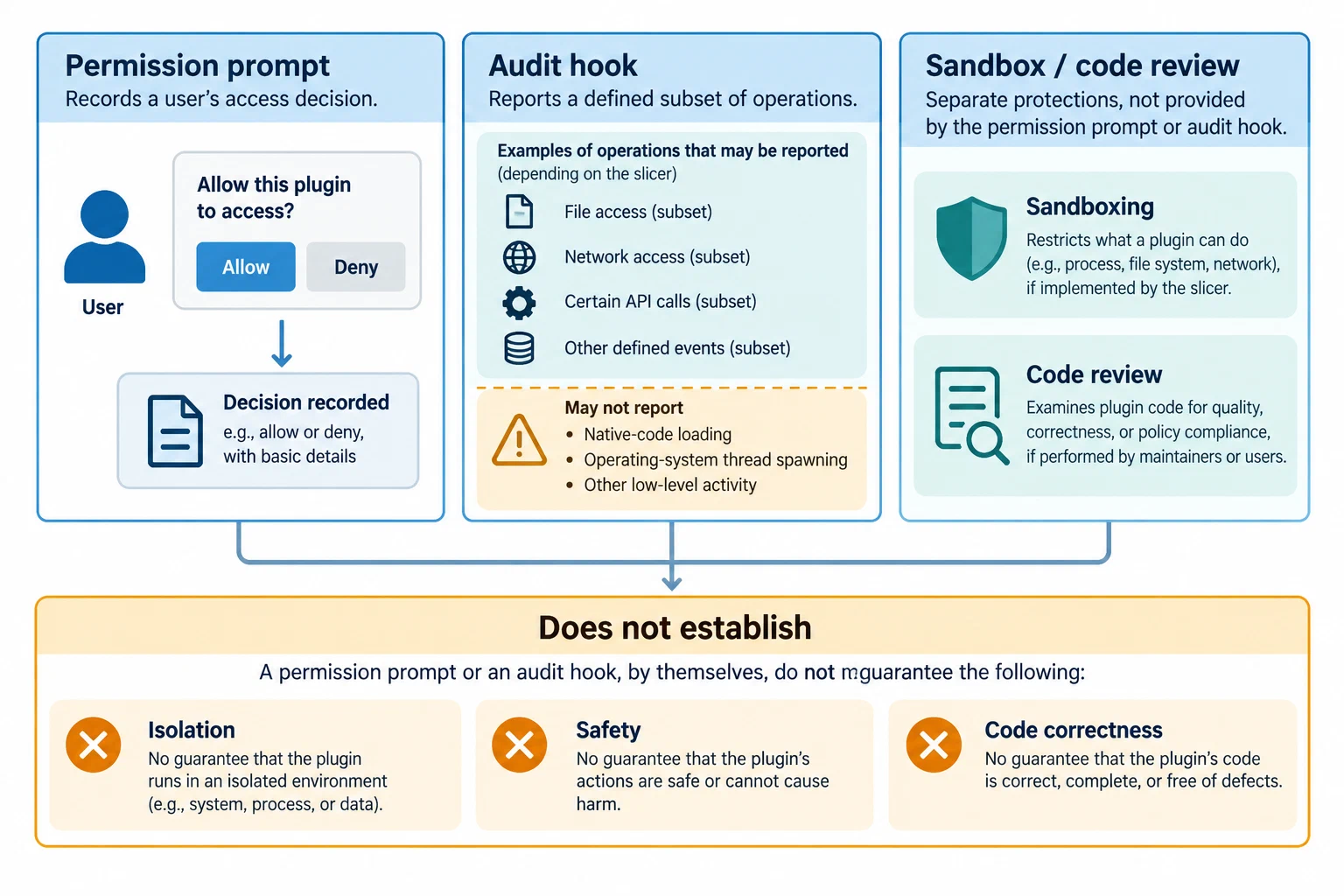
The OrcaSlicer plugin audit documentation describes an interactive permission system, not a sandbox. A prompt records a permission decision; it does not certify the code or guarantee isolation. The current page also identifies operations such as native-code loading and operating-system thread spawning as outside the documented audit coverage. These details can change, so check the project’s current documentation for the exact release. Do not interpret a plugin listing, permission prompt, or remembered approval as a code review.
Keep a dependency and output record
Use a compact record when saving or sharing an extension-dependent profile:
slicer: "name, exact release, and channel"
plugin:
  name: "plugin name"
  source_and_author: "recorded source and publisher"
  package_and_version: "package identity and installed version"
  status: "installed, active, and selected capability"
  configuration: "global or saved-preset override"
preset_reference: "resolved, missing, inactive, or unknown"
transformations:
  - "script or capability, order, and stage"
output:
  file: "final local file or package"
  inspected_after_all_steps: "yes/no and what was checked"
physical_check: "not performed, or setup and observed result"
This is a human-readable handoff, not a universal plugin format. Keep credentials and private paths out of shared records. For command-line inputs and logs, use Reproduce a slicer CLI run and verify its output . For a broader preset handoff, see Import, export, version, and supersede a profile .
Back to top ↑