Several slicer controls can change how much filament reaches the nozzle or how the toolpath responds to motion. They are not interchangeable fixes. Start with the visible symptom and the complete setup: printer and drive path, firmware, nozzle, material product and dry state, layer height, speed, slicer release, plate, and selected profile. Then test the narrowest control that plausibly affects that symptom.
What each control actually changes
| Control | Main question | Common signals to investigate | Boundary |
|---|---|---|---|
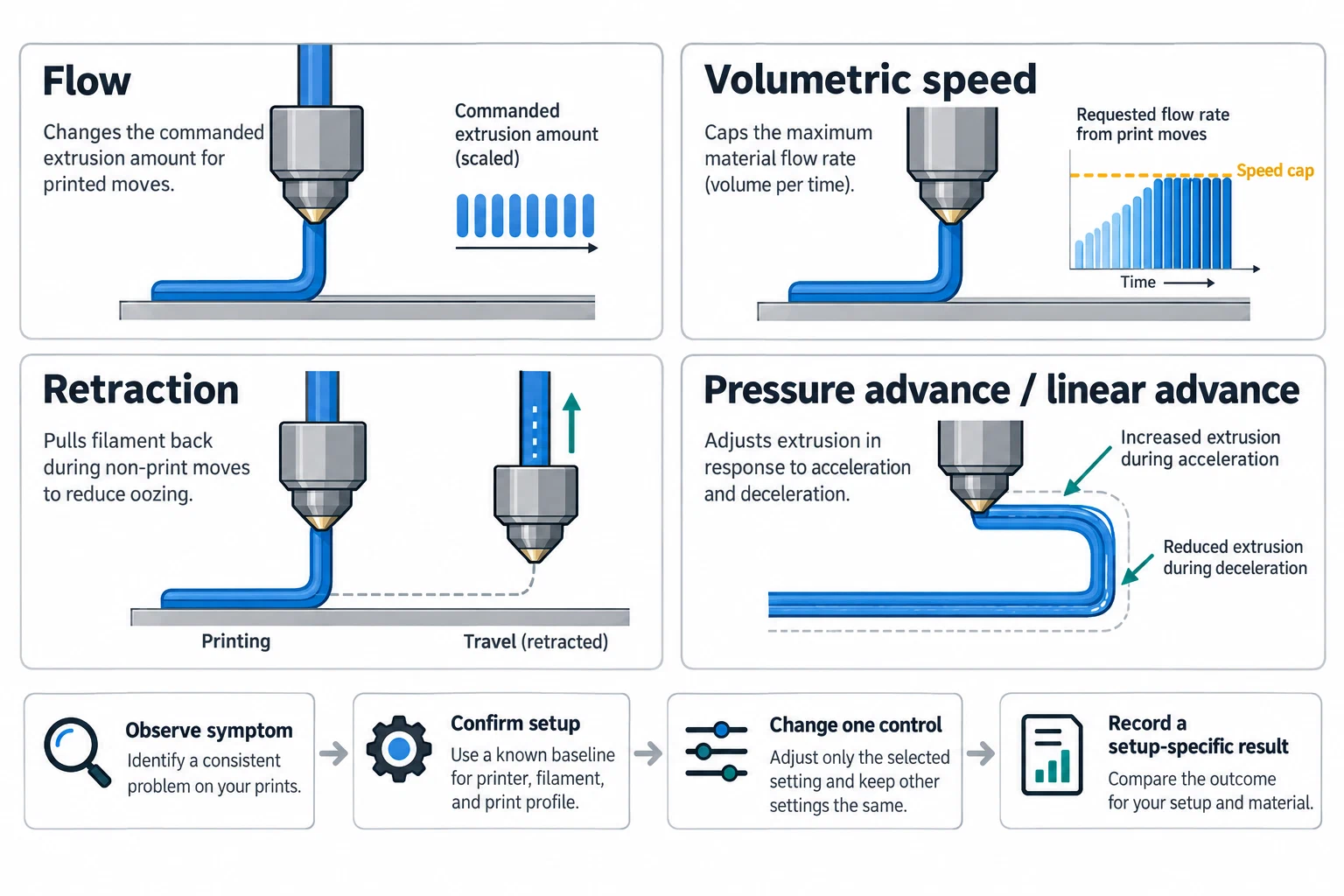
| Flow ratio or extrusion multiplier | Is the commanded extrusion proportionate for this material and setup? | gaps or weak layers when too low; excess material, rough surfaces, or dimensional error when too high | It changes extrusion amount. It does not repair a blocked nozzle, wet filament, wrong nozzle diameter, or an incorrect machine profile. |
| Maximum volumetric speed | Is the requested melt volume above what this material/nozzle/hotend combination can sustain? | quality deteriorating only as speed or line width rises; under-extrusion at high demand | It limits speed when the melt-volume cap is reached. It is not the same as a print-speed number and is setup-specific. |
| Retraction | How much filament is pulled back during travel or a tool change? | stringing or oozing, but also grinding, clogs, or under-extrusion when excessive | It depends on drive path, material, nozzle, temperature, travel behavior, and tool-change context. |
| Pressure advance or linear advance | How should extrusion respond to acceleration and deceleration pressure lag? | corners, seams, pressure-related blobs, or line-width changes during speed transitions | The firmware and motion/extrusion geometry must support the control. PA and LA are related concepts, not automatically the same command or value. |
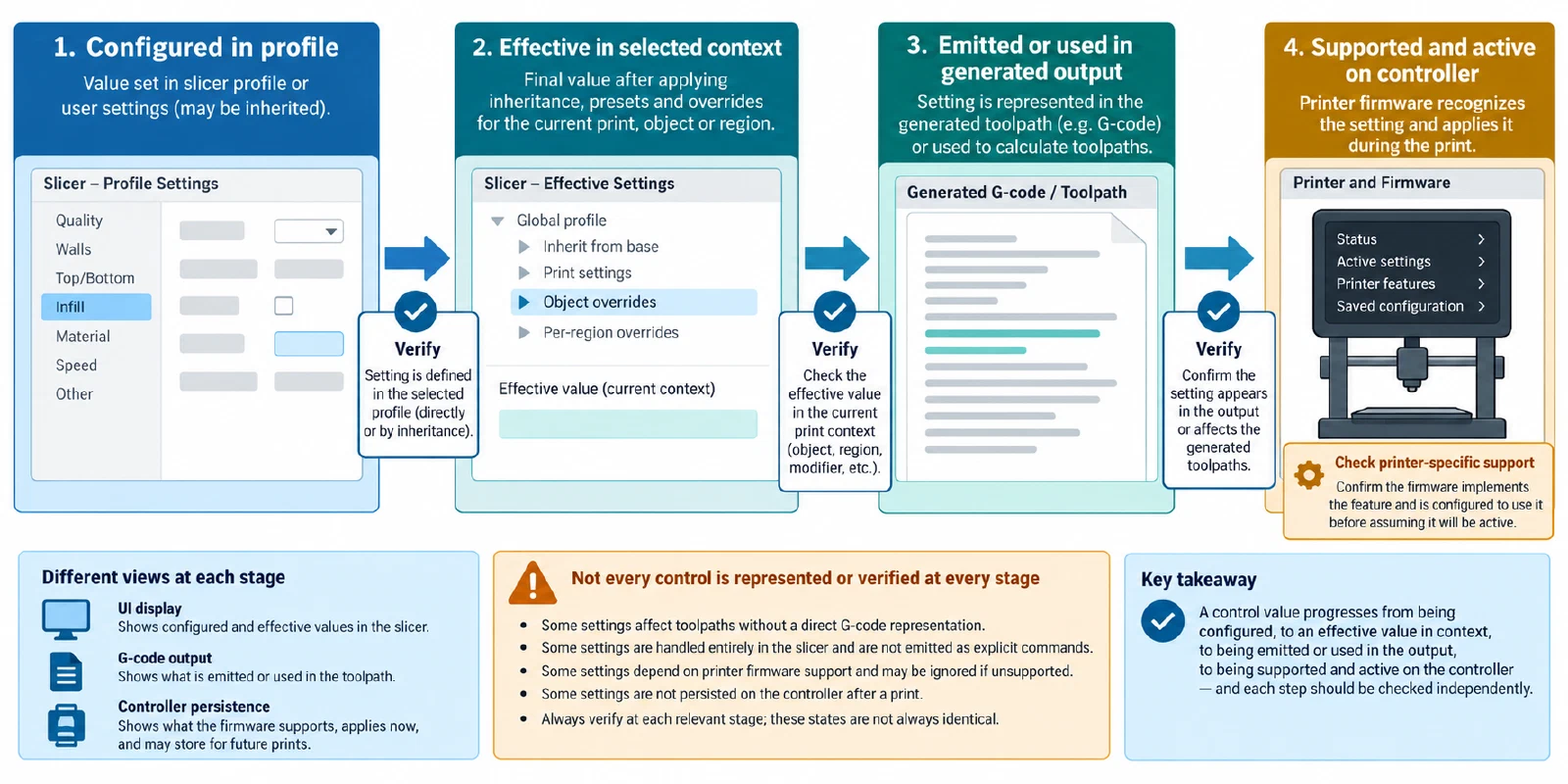
OrcaSlicer places flow ratio and pressure advance in the selected material profile, documents material-level retraction overrides, and describes maximum volumetric speed as a melt/extrusion-volume limit. Those are OrcaSlicer semantics. Other slicers may use terms such as extrusion multiplier, max flow, or firmware-specific pressure controls with different resolution and precedence.
Choose by symptom, not by favorite setting
Use this differential before changing anything:
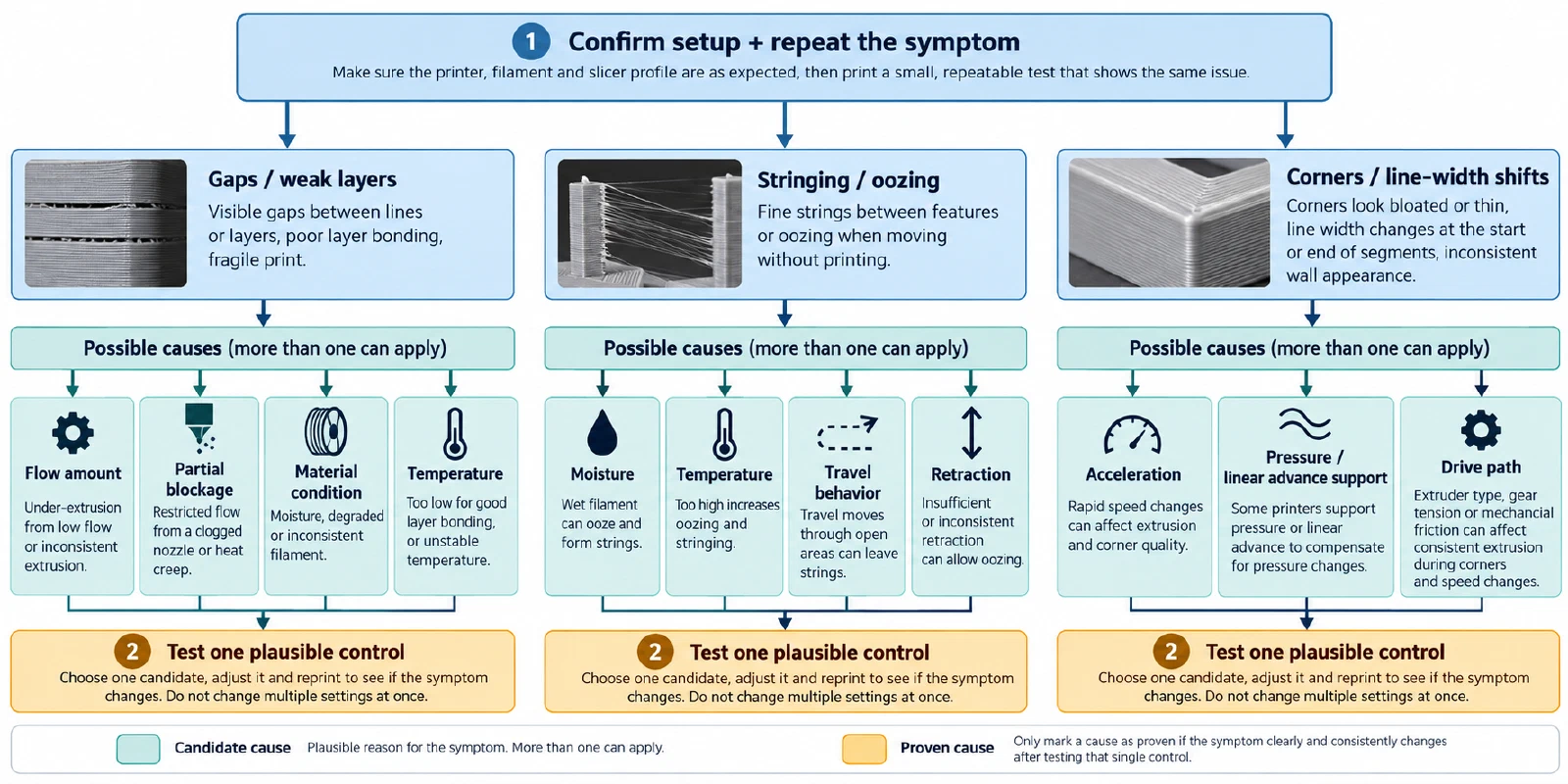
- Gaps or weak layers across slow and fast features: confirm filament diameter, nozzle selection, partial blockage, temperature, material condition, and flow calibration. A low flow ratio is one possible signal, not a unique diagnosis.
- Excess material or rough dimensions at ordinary speeds: confirm nozzle diameter, line width, temperature, first-layer effects, and flow. Measure the same test object before deciding that flow alone is wrong.
- Under-extrusion only at high speed or wide lines: investigate maximum volumetric speed, temperature, hotend capacity, nozzle, and material. A volumetric cap can reduce requested speed, but it cannot make a hotend melt more material than the setup supports.
- Strings between isolated features: check nozzle contamination, moisture, temperature, travel, and retraction. Retraction length and speed are not portable values, and excessive retraction can create a different under-extrusion or clogging problem.
- Corner bulges or line-width changes during acceleration: check pressure or linear advance only after the machine, firmware, drive path, nozzle, material, and speed context are correct. Do not copy a PA/LA number from a different firmware or extruder.
- A symptom that changes with one feature or object: inspect per-object, per-extruder, material override, support, and cooling settings before changing a global control.
Calibrate in a controlled context
OrcaSlicer documents a recommended sequence of temperature, flow, pressure advance, retraction, and maximum volumetric speed tests. Treat that as OrcaSlicer guidance, not a universal ritual. A practical controlled sequence is:
- Record the exact printer, firmware, drive path, nozzle, plate, material product, dry state, slicer release, and starting profiles.
- Establish a usable temperature window for the selected material and nozzle before comparing extrusion controls.
- Calibrate flow or extrusion amount with the intended geometry and layer height. Save the result in the material profile only after recording the method and observed result.
- Test pressure advance or linear advance with the firmware’s documented method. For pressure advance, choose the direct-drive or Bowden procedure that matches the machine; for Marlin, confirm that the firmware feature and command are enabled as required by the relevant documentation.
- Test retraction with the actual drive path and material. Observe stringing, tip formation, grinding, and under-extrusion together rather than optimizing one visual artifact.
- Test maximum volumetric speed using the selected nozzle, material, temperature, and machine. Increase demand until the quality-failure onset is observed, then store a conservative, context-labeled limit.
- Print a representative part and retain the old profile. Change one major variable per iteration.
Adaptive pressure advance and adaptive volumetric-speed features add more conditions and may be release- or firmware-gated. Record whether the feature was experimental, which data it used, and how the final value was stored. A completed calibration test is a method result, not proof that a value transfers to another printer, material batch, nozzle, firmware, or slicer.
Store the result as a profile record
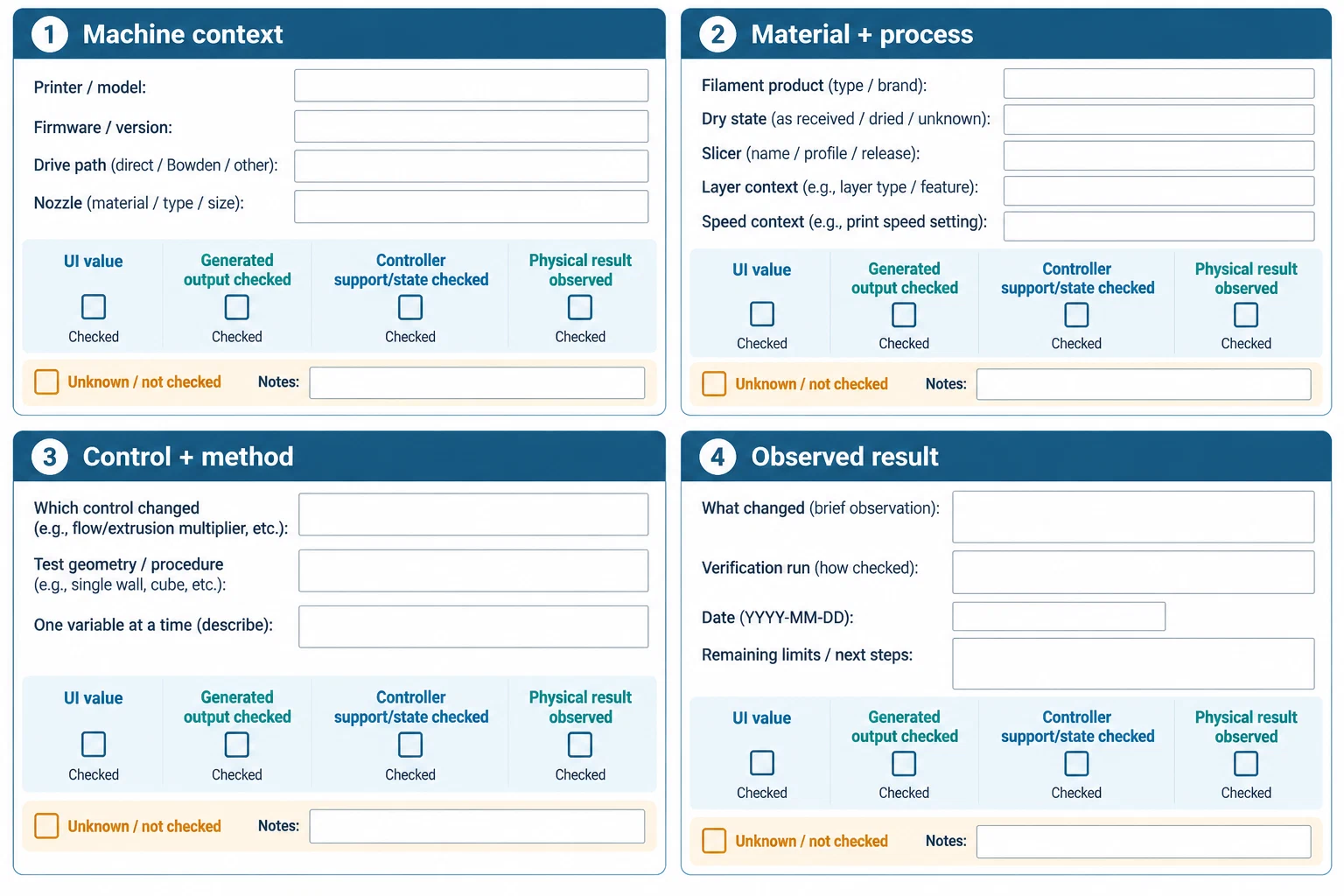
For every changed control, save:
printer: "exact model and variant"
firmware: "release and relevant feature state"
nozzle: {diameter_mm: 0.4, material: "type", wear: "state"}
material: {vendor: "name", product: "grade/color", dry_state: "state"}
slicer: {name: "name", release: "version", process: "preset"}
control: "flow / volumetric speed / retraction / PA / LA"
method: "test object and procedure"
result: "observed result, not a universal value"
verification: "representative part, date, and remaining limits"
If several controls appear wrong at once, stop and return to How to Adapt a Print Profile After Changing a Nozzle, Plate, or Slicer . For a printer-specific symptom, pair this article with PETG stringing and oozing or the relevant calibration procedure instead of treating an extrusion value as the diagnosis.
Back to top ↑