A shared profile is useful only when another maker can tell what it applies to, what was tested, what changed, and how to go back. Treat import and export as packaging operations around a compatibility record. The file is not the record by itself, and a successful import is not a physical validation result.
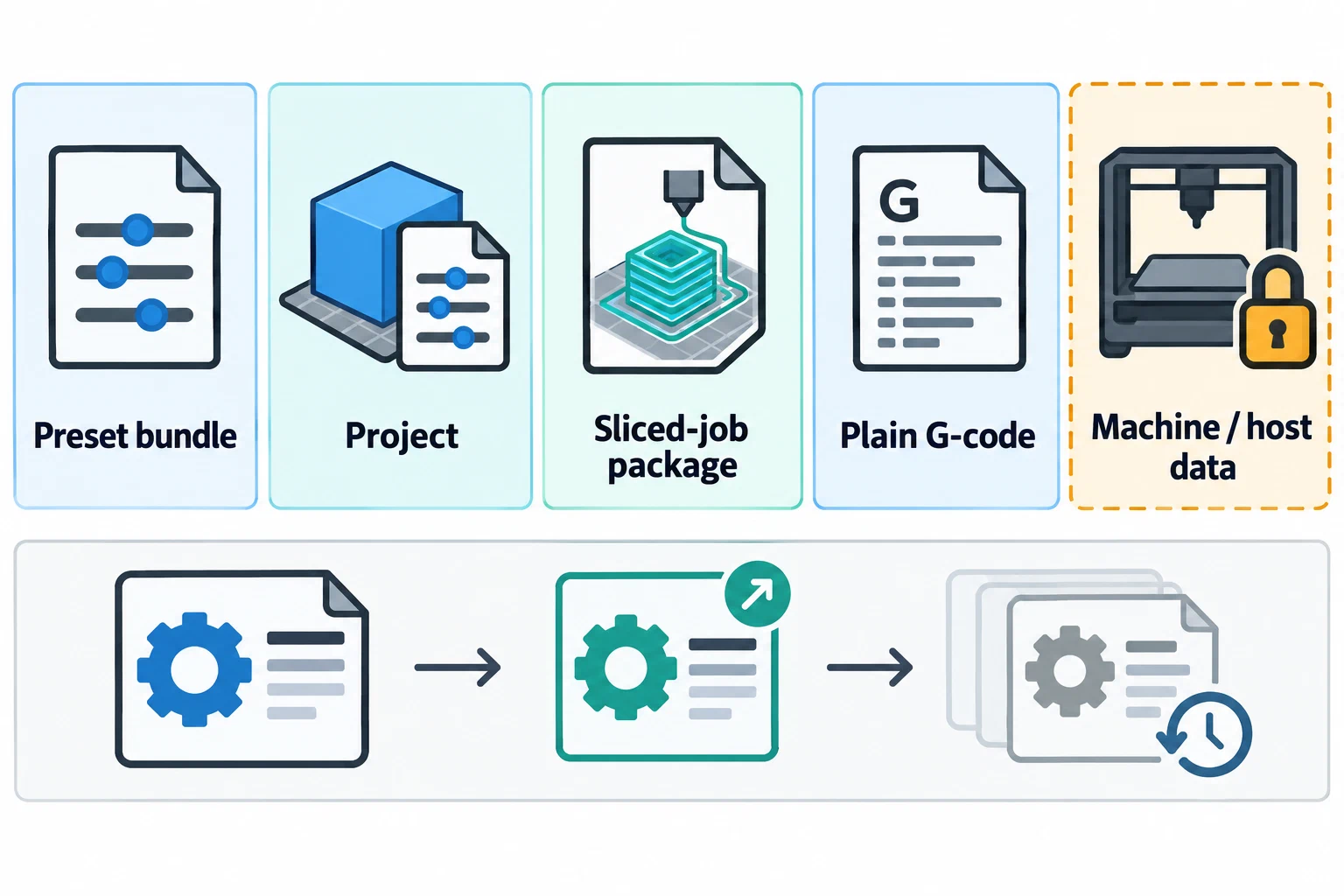
Choose the handoff object deliberately
Export forms preserve different state. OrcaSlicer separates printer bundles, filament/process presets, projects, metadata-bearing 3MF, and plain G-code; PrusaSlicer distinguishes single configurations, project configurations, bundles, and bundles with physical printers. Cura SDK backup is release-qualified configuration state, not a release-neutral interchange format.
Orca Publish 3MF (>2.5.0/nightly) overlays selected print settings on a model and recipient settings; unlike Save Project, it omits the full snapshot without changing printer setup. Cura UCP (5.7+) carries model settings/modifiers; a full project includes printer, model, and material settings. Opening a UCP may overwrite printer settings and clear plate models; model-only import omits project settings and adjustments.
Use the smallest object that preserves the reader’s purpose:
- Reusable process handoff: settings or preset bundle with no printer-host credentials.
- Project handoff: model objects, modifiers, print settings, and selected configuration when the recipient must reproduce the slice context.
- Sliced-job handoff: a packaged output only when the target workflow supports that format and the package’s metadata scope is understood.
- Machine or host handoff: a separate, restricted operation. It may contain IP addresses, API keys, or other endpoint data and should not be treated as an ordinary shareable profile.
Do not call plain G-code a portable profile. Do not call a project or package a guarantee that the recipient’s machine will accept or print it.
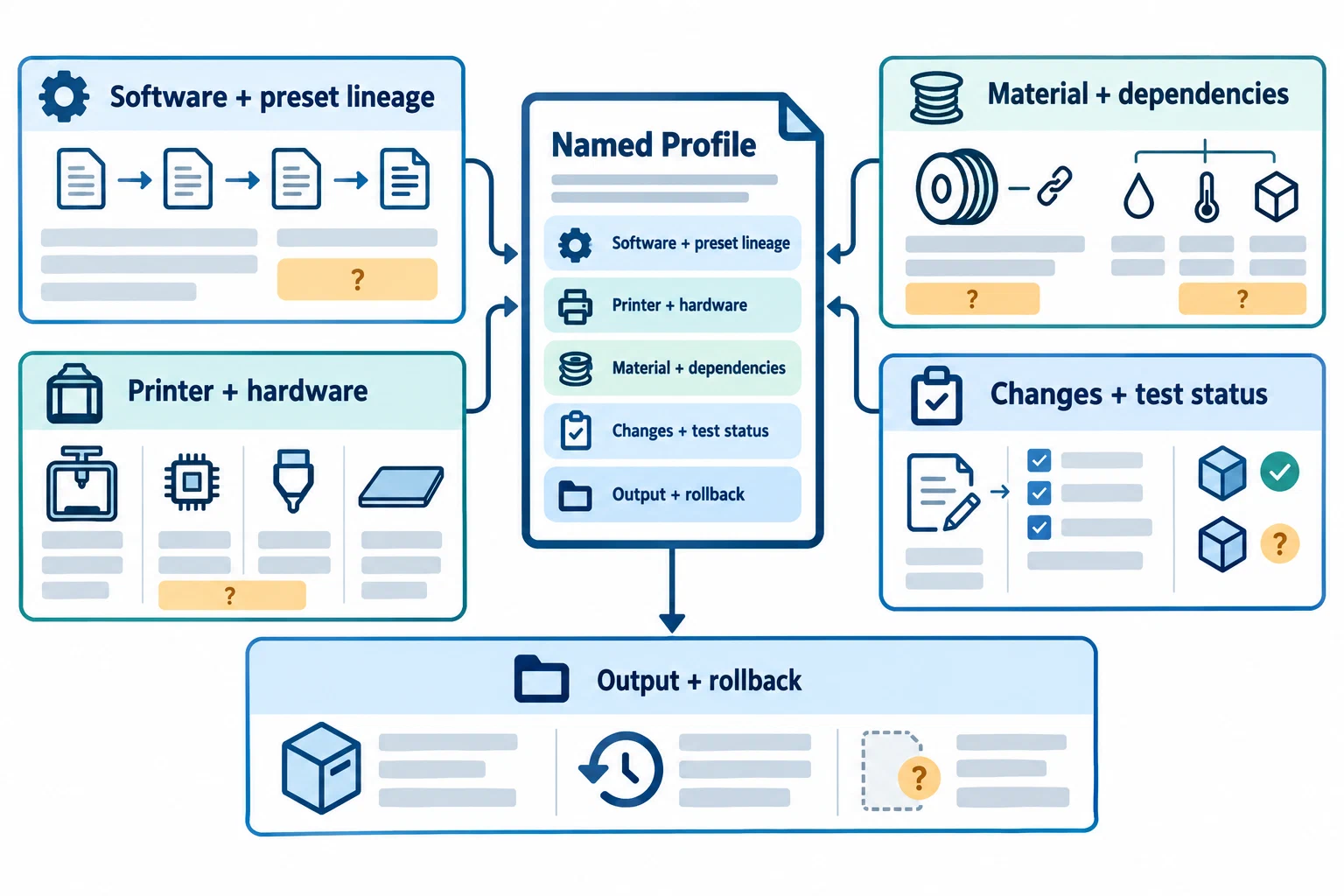
Write a profile identity card
Before exporting, record the context that gives the values meaning:
profile_id: "human-readable name plus internal revision"
status: "starting-point / physically-verified / superseded"
slicer: {name: "OrcaSlicer", release: "exact version", channel: "stable/beta/unknown"}
printer: {model: "exact model", variant: "variant", firmware: "release or unknown"}
nozzle: {diameter_mm: 0.4, material: "actual type", wear: "new/used/unknown"}
plate: "surface and selected plate profile"
material: {vendor: "name", product: "grade/color", dry_state: "recorded/unknown"}
presets: {machine: "name", material: "name", process: "name"}
source: "preset, bundle, project, or repository origin"
changes: ["field or relationship changed"]
test: {object: "name", date: "date", result: "observed result or not tested"}
output: {format: "file/package", post_processing: "none or described"}
rollback: "previous profile identifier or snapshot"
extensions: "plugin/script source, author, version, capability, and active state"
command_line: "executable release, exact inputs, overrides, selected plate, and output"
This is a handoff recommendation, not a universal schema. It makes unknowns visible instead of allowing a profile name to stand in for printer, firmware, nozzle, or material identity.
An extension or command-line run can add state that the profile file does not explain by itself. For a preset that refers to a plugin capability, record its source, author, version, enabled state, and whether the saved preset has its own capability configuration; a reference is not a portable code package or proof that the same dependency is available to another user. When a local slice was generated from a command line, preserve the exact executable release, project and configuration inputs, override order, selected plate, and output path. See Reproduce a slicer CLI run and verify its output and Slicer plugins and G-code post-processing for those separate records.
Inspect before importing
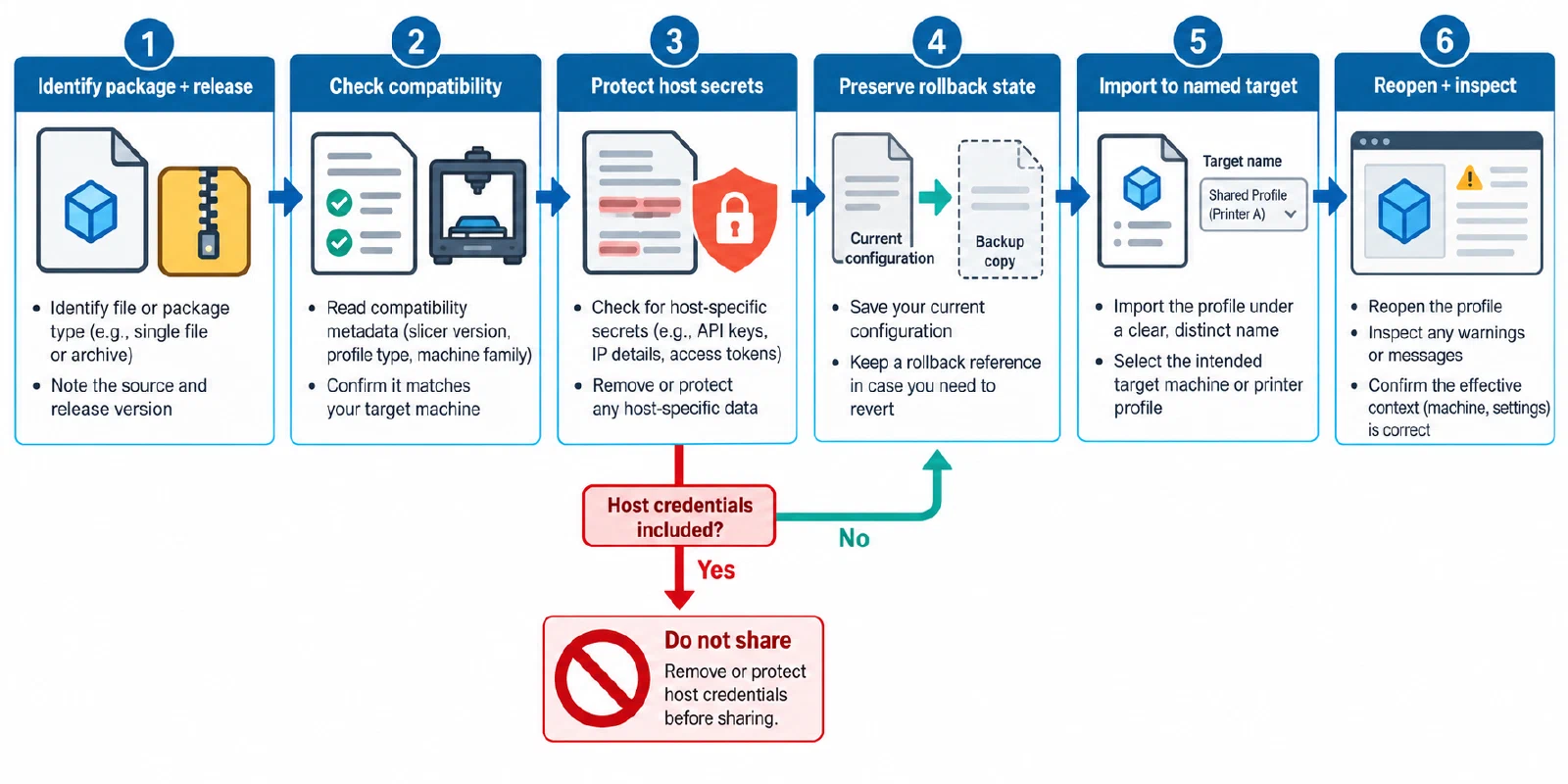
- Confirm the source. Identify the slicer release, release channel, profile origin, package type, and whether the artifact is a preset set, project, backup, or already-sliced job.
- Check compatibility metadata. PrusaSlicer vendor bundles can carry printer/variant/nozzle conditions and minimum or maximum compatible slicer versions. OrcaSlicer profile-development guidance distinguishes profile types, compatible-printer references, and instantiated preset identity. Treat these as software guards, not as proof of a successful print.
- Separate machine-bound data. A PrusaSlicer export with physical printers can include an API key and IP address. Keep reusable settings separate from host credentials. Never publish a real key in a profile, example, screenshot, or issue report.
- Preserve the old state. Take a configuration snapshot or copy before applying an update when the slicer supports it. Record the originating release and whether the application copied or migrated state. A snapshot or backup is a rollback aid, not evidence that a later release can restore every field safely.
- Import into an isolated or clearly named target. Do not overwrite the only known-good profile. Open the imported object, select the intended machine/material/nozzle/plate, and inspect warnings, inheritance, overrides, and release-channel status.
Version and supersession rules
Give each meaningful change a new revision or profile identifier. In OrcaSlicer, the documented profile-development workflow requires identity rules for instantiated presets and a vendor version bump after profile updates. Its repository checks treat compatibility references, names, obsolete keys, identifiers, and custom-G-code slice expansion as separate software checks. Passing those checks means that the profile or output passed defined software gates; it does not establish a physical print.
Use a change note that answers:
- What changed: machine, nozzle, plate, material, process, firmware, script, or package format?
- Why: calibration result, release migration, correction, hardware change, or documentation update?
- What was revalidated: preview, software validator, first layer, flow, volumetric limit, retraction, pressure, or representative part?
- What remains unknown: untested firmware, material batch, release channel, geometry, or target machine?
- What does this revision supersede, and where is the rollback reference?
A slicer update does not automatically invalidate every profile, but it creates a new review context. PrusaSlicer documentation describes snapshots and release-channel migration behavior; OrcaSlicer release notes show that profile and project interpretation can change in a named release. Record the release rather than relying on a filename such as final.
Revalidate after import or update
Use an increasing-cost check:
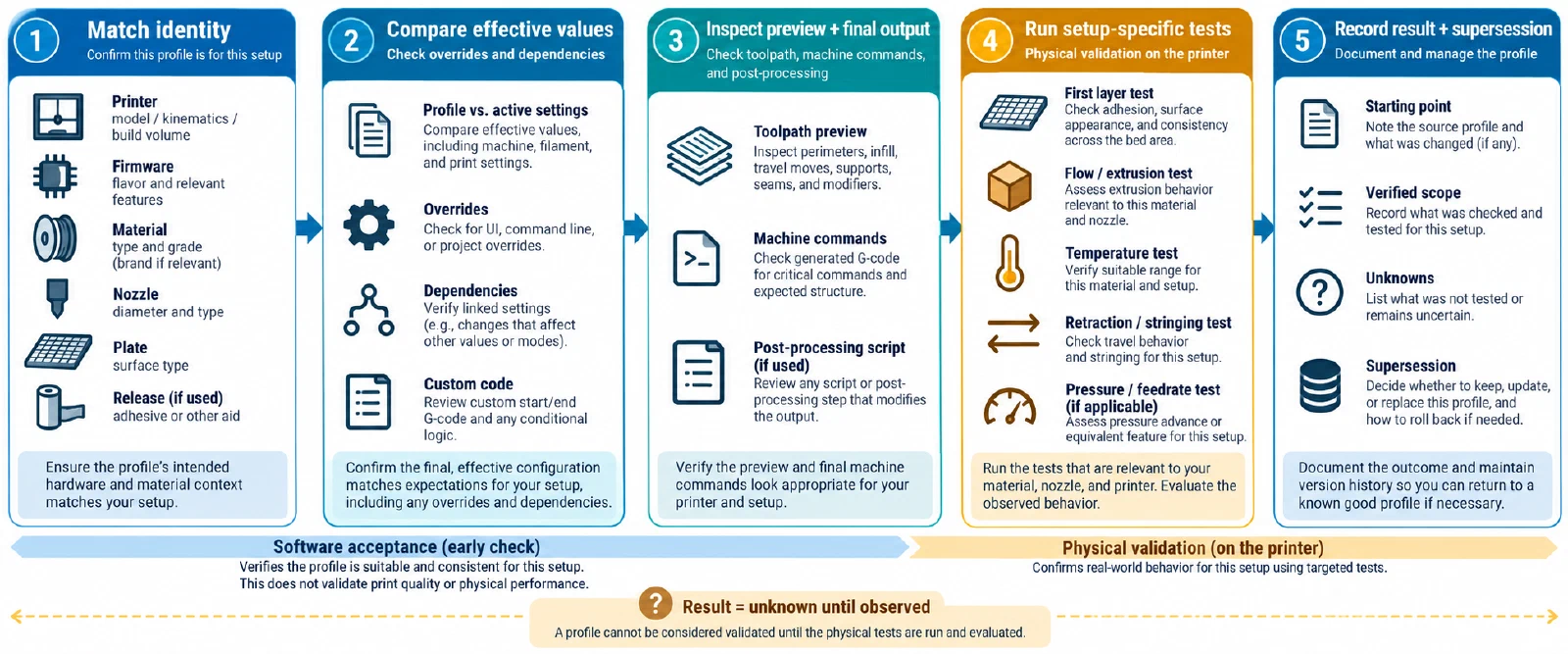
- Confirm the identity card against the selected printer, firmware, nozzle, plate, material product, and slicer release.
- Compare effective values and overrides, including line widths, temperatures, cooling, flow, maximum volumetric speed, retraction, pressure control, supports, and machine G-code.
- Inspect the preview and the final exported file or package. Note whether post-processing changed the output or whether resolved configuration was omitted from the file.
- Print a small first-layer or calibration object on the actual setup.
- Run the control-specific test appropriate to the change, then print a representative part.
- Mark the imported profile as a starting point until the stated physical check is complete.
If the result fails, restore the previous revision, record the failed context, and change one major variable at a time. If the result succeeds, keep the old profile as a rollback reference and publish the new profile as valid only for its recorded printer, material, nozzle, plate, firmware, slicer release, and test conditions. Continue with How to Adapt a Print Profile After Changing a Nozzle, Plate, or Slicer when the change began with hardware or process context.
Back to top ↑